彻底移除驱动程序 零残留

Display Driver Uninstaller (DDU) is a driver removal utility that helps you completely uninstall AMD, NVIDIA, and Intel graphics drivers without leaving leftovers like registry keys and folders.

信任ed by gamers, IT professionals, and PC builders worldwide.

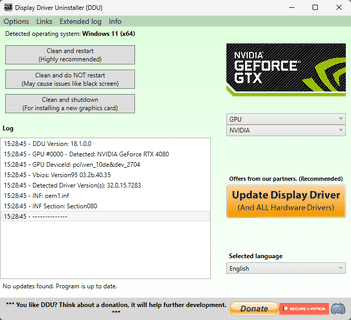
DDU Interface displaying NVIDIA driver removal

Overview

什么是 Display Driver Uninstaller?

DDU is a lightweight, portable utility designed to completely remove video card drivers, ensuring your system is as clean as a fresh Windows installation.

深度清理ing

Removes files, folders, and registry keys that standard uninstallers often leave behind.

Multi-Vendor Support

Fully supports NVIDIA, AMD, and Intel graphics drivers, as well as Realtek audio.

谁需要 DDU?

Gamers

Experiencing stuttering or FPS drops? A clean install with DDU often resolves these performance issues.

PC Builders

Switching from NVIDIA to AMD? You must remove old drivers completely to avoid conflicts.

Tech Enthusiasts

Troubleshooting black screens or system instability? DDU gives you a clean slate.

How to Use DDU Safely

Using DDU is powerful, but it requires following the right steps to ensure safety. Our comprehensive guide covers:
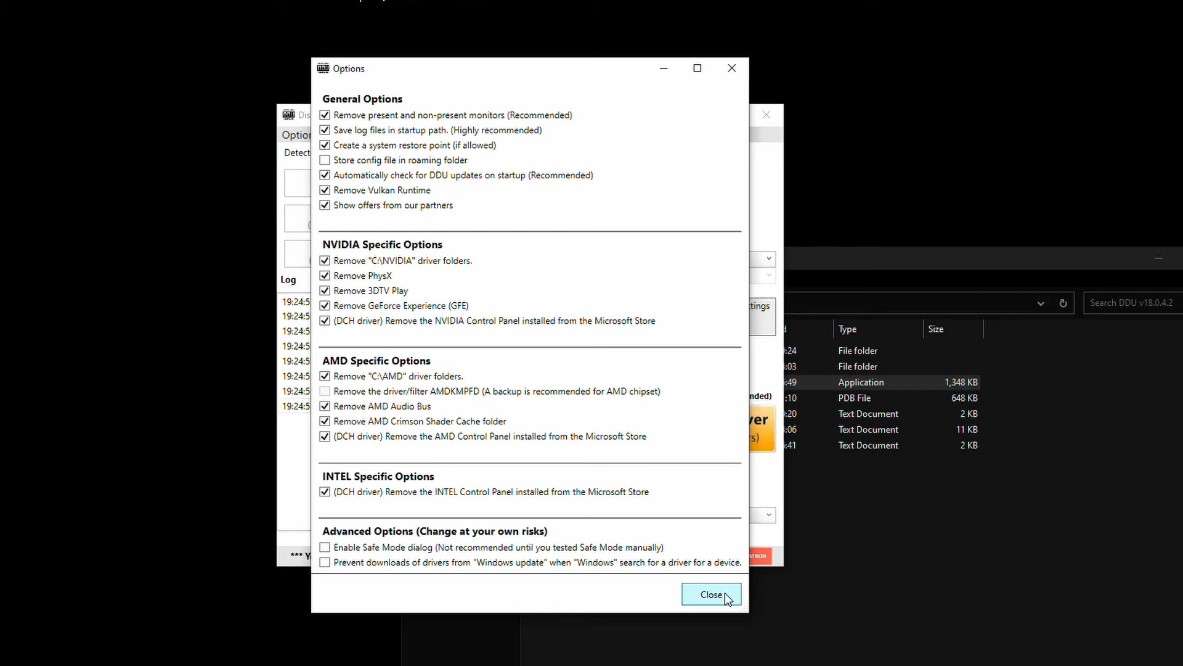
  • Booting into Safe Mode (Highly Recommended)
  • Disconnecting from the Internet
  • Selecting the correct removal options
阅读完整指南
Extract and launch DDU

Performance

Why Standard Uninstall Isn't Enough

Windows Control Panel

  • Leaves orphaned registry keys
  • Does not remove Driver Store files
RECOMMENDED

Display Driver Uninstaller

  • Removes ALL associated registry keys
  • Cleans the Driver Store component

常见问题解答

使用 DDU 安全吗?

Yes, it is widely used and trusted. However, we always recommend creating a 系统还原点 before use.

Do I really need Safe Mode?

强烈建议使用安全模式 to ensure all files are released by Windows and can be deleted properly.
查看所有常见问题

准备好修复驱动程序问题了吗? 立即下载 DDU 以获得全新体验。